
Inventory Management & Re-Stock Threshold Optimization
Following a company merger, I identified and resolved significant overspending on inventory by developing a custom Excel-based stock management tool that accurately forecasted weekly needs. The result: thousands of dollars in savings per week, no stock shortages, and a more efficient, data-driven replenishment process.
Client / Company Context
After acquiring Company B, a smaller wholesale distributor, Company A inherited its products, vendors, and customer base. Despite Company A’s larger scale and better vendor relationships, Company B’s post-merger vendor invoices remained unexpectedly high—nearly matching those of the parent company. This raised a key operational concern: Was Company B overstocking relative to its actual demand?
Challenge
Company B’s purchasing habits were based on historical routines rather than data. Each week, they ordered roughly $20,000 in inventory from a primary vendor—without any analytical justification tied to real customer movement or sales velocity.
The result:
- Excess capital tied up in slow-moving stock
- Overcrowded storage and increased carrying costs
- Limited visibility into what products truly needed replenishment
Solution
I designed and implemented a custom Excel-based stock management system that combined manual physical counts with automated demand-based calculations.
The tool was structured into three key categories:
- Needed Stock Level Weekly – the quantity required based on weekly product movement
- Have in Stock – current on-hand count after physical verification
- Will Order – dynamically calculated difference to maintain optimal stock levels
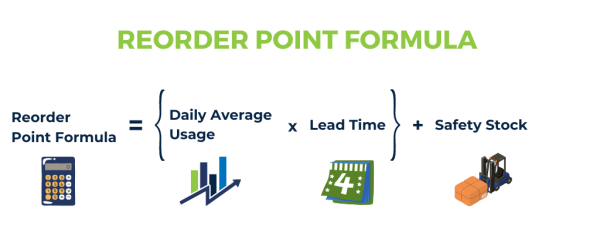
This framework enabled a data-driven re-ordering process that replaced guesswork with precise thresholds rooted in actual sales data.
Implementation Process
- Data Analysis: Reviewed several months of Company B’s product movement and sales reports.
- Tool Design: Built formulas and logic in Excel to auto-calculate weekly restock needs.
- Testing: Conducted live trials comparing the tool’s recommendations with traditional order patterns.
- Adjustment: Fine-tuned reorder levels to balance between customer satisfaction and storage efficiency.
- Deployment: Trained the purchasing team to use the “Needed / Have / Will Order” tracker during weekly order cycles.
Results
- Standardized the ordering process, making it transparent and replicable across departments.
- Reduced inventory spending by eliminating unnecessary purchases.
- Achieved cost savings of several thousand dollars per week.
- Maintained 100% order fulfillment without stockouts or shortages.
- Freed working capital for other operational priorities.
Key Takeaways
- Post-merger operations often hide invisible inefficiencies; data exposure is key.
- Simple tools, when structured strategically, can unlock major financial impact.
- Establishing a visible link between product movement → stock level → reorder trigger prevents both overstocking and missed sales.
- A clear system fosters team accountability and supports seamless integration during acquisitions.
Tools & Skills Used
Excel (Advanced Formulas, Conditional Logic, VBA)
Inventory Analysis | ERP Integration Prep | Process Optimization
Outcome Summary
Result: Reduced excess inventory costs and optimized replenishment strategy.
Impact: Thousands in weekly savings and improved operational visibility.
Deliverable: Custom Excel tool — “Needed Stock Weekly,” “Have in Stock,” “Will Order.”